Your booking reference and confirmation page
Right after you send a booking request, the booking confirmation page opens.
Step 1: Message
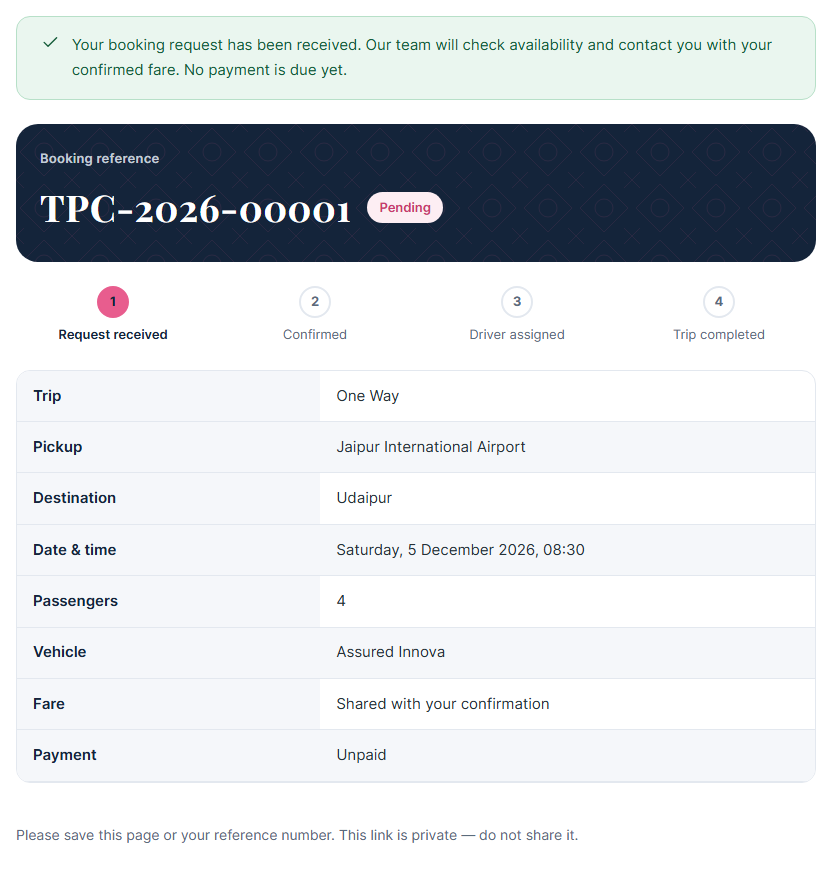
“Your booking request has been received…” — our team will check availability and contact you with your confirmed fare. No payment is due yet.
Step 2: Booking reference and status
Your reference number, like TPC-2026-00001, and the current status (here Pending). Please quote this number whenever you contact us.
Step 3: Progress
Request received → Confirmed → Driver assigned → Trip completed. The current step is highlighted.
Step 4: Your trip details
Trip, pickup, destination, date and time, passengers, vehicle, fare and payment. The fare shows “Shared with your confirmation” until we confirm it.
Opening the page again later
- If you gave your email, the email “booking request received” has a button View your booking.
- Or bookmark the page in your browser.
- The page updates as your booking moves on — for example it shows your driver's name and number and your car once they are assigned.
Important
The link is private — anyone with it can see your trip details. Please do not share it. Lost the link? Call or WhatsApp us with your reference number.
Was this article helpful?